NHS Mailboxes
Forwarding Emails from Shared NHS Mailbox to Personal NHS Email
Forwarding emails you receive in your NHS shared mailbox to your personal NHS mail account can help you access important information through one account. This tool we found can be very useful for contractors to stay in touch with important emails sent from NHS England.
If you have any queries relating to setting this up please email enquiries@cpgm.org.uk.
How to forward Emails from your Shared Email Box to your personal or any other email
Please complete the following steps in this order;
- 1. Log in to your shared email box
- 2. Click the settings icon / gear on the top right hand side of email window
- 3. Click on ‘rules’
- 4. Click ‘add rule’
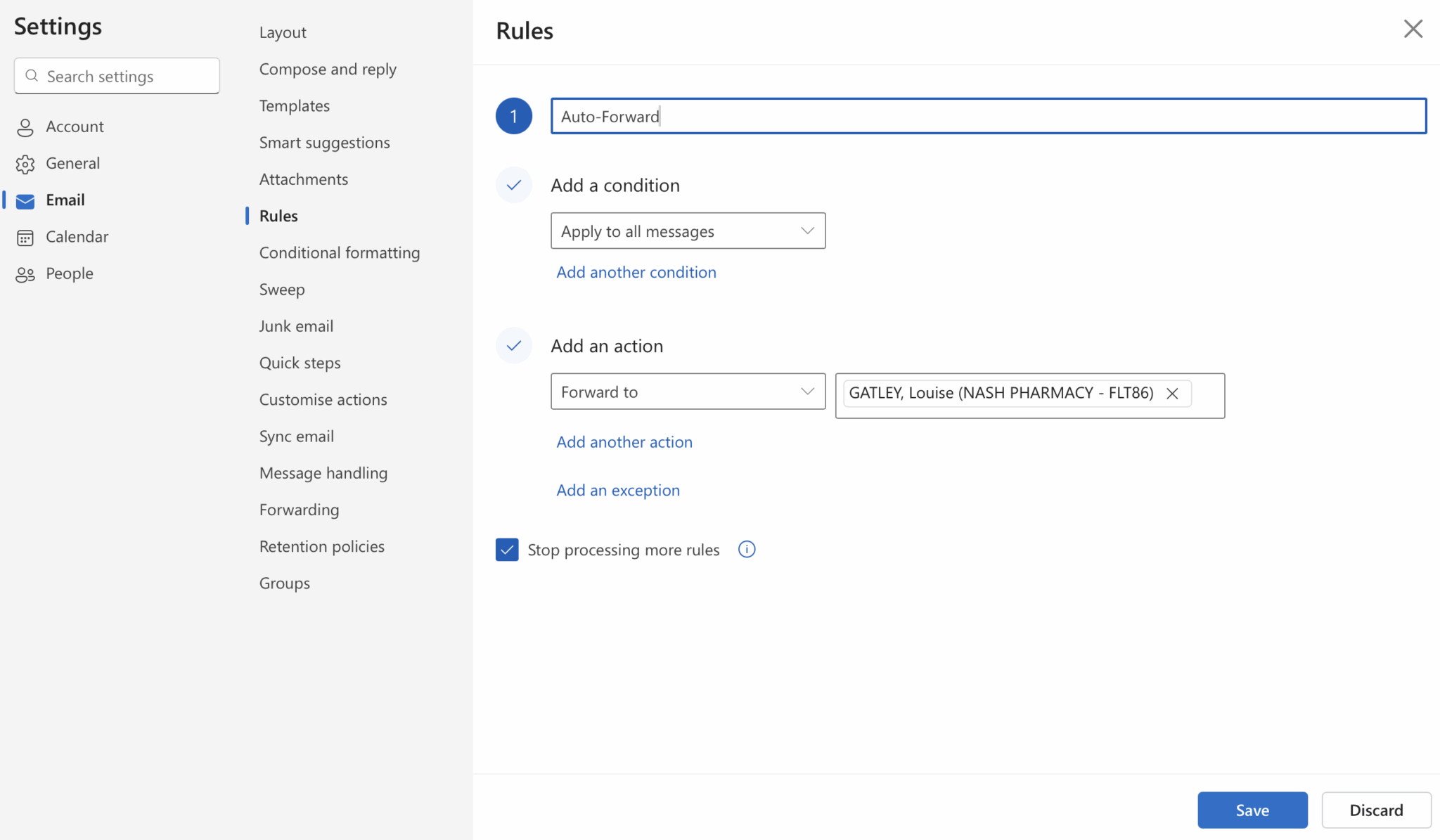
- 5. Name your rule ‘Auto-Forward’
- 6. Click on ‘Add a condition’
- 7. Select ‘Apply to all messages’
- 8. Click on ‘Add an action’
- 9. Select ‘Forward to’
- 10. Add your personal e-mail
- 11. Click ‘Save’
Click here to view an example screenshot of this process
CPGM NHS Shared Mailbox Guide: We’ve produced this new guide to provide pharmacy teams with step by step instructions around how to resolve other common issues. click here to view.